Edit Files Directly in Storage: From File Manager and Jupyter Notebooks
You can now edit files in place on your object storage - both from Ilum's built-in File Manager and from Jupyter Notebooks using our new open-source extension. No more downloading, editing locally, and re-uploading.
Edit in File Manager
Select any text-based file (JSON, CSV, SQL, config files, etc.) in the File Manager and open it in a full code editor modal with syntax highlighting, line numbers, and code folding. The editor shows file metadata (size, last modified, editing state) at the top, and you can Save changes directly back to storage or Cancel to discard. The file stays in place, same path, same bucket, with the modification timestamp updated automatically.
Edit in Jupyter Notebooks
The same storage files are now accessible from within Jupyter through our open-source JupyterLab Bucket Explorer extension. A file tree in the left sidebar shows your S3 buckets and folders with file metadata (name, path, writable status) on hover. Open any file as a tab in JupyterLab's editor alongside your notebooks, edit, save, and keep working without switching back to the Ilum UI. The extension connects to the same storage backend, so changes are immediately visible across both interfaces.
Our JupyterLab extension is fully open source. Use it standalone with any S3-compatible storage, or let Ilum configure it automatically when Jupyter is enabled as a module.
Why it matters
Small edits to config files, schema definitions, or seed data shouldn't require a download-edit-upload cycle. Whether you're fixing a JSON schema in the File Manager or tweaking an OpenLineage spec alongside a notebook in Jupyter, the file is editable right where you found it.
DuckDB SQL Engine Lightweight Analytics with Full Lineage & Catalog Integration
Ilum now supports DuckDB as a third SQL engine alongside Spark and Trino, giving you a fast, in-process analytics engine that's fully wired into the platform, not a standalone toy.
What makes this different from standalone DuckDB
DuckDB in Ilum isn't just an embedded database running in isolation. Every query you run is tracked through data lineage, connected to the internal data catalog, and backed by the new DuckLake catalog (created automatically when you enable the module). Nothing lives only in memory, your tables, schemas, and metadata are persisted and visible across the platform, just like Spark and Trino workloads.
What you can do
Run ad-hoc analytical queries with sub-second response times - aggregations, joins, window functions - without spinning up a cluster.
Query existing tables from Ilum's data catalog directly. No need to re-register or recreate anything - if it's in the catalog, DuckDB can read it.
Track every DuckDB operation in data lineage, the same way Spark and Trino jobs are tracked. Full visibility into what was read, written, and transformed.
Use DuckDB as a query engine in Apache Superset and other BI tools connected to Ilum, dramatically speeding up dashboard queries on catalog data.
Work with the DuckLake catalog out of the box - it's provisioned automatically and integrated with the platform's metadata layer.
Three engines, one platform
With this release, Ilum offers a clear engine strategy: DuckDB for lightweight, interactive workloads, Trino for federated and medium-scale queries, Spark for heavy batch processing and ETL.
Pick the right tool per query, all from the same SQL editor, same catalog, same lineage graph. In upcoming releases, DuckDB will become the default engine for smaller workloads, making everyday data exploration even faster.
Where to find it
Open the SQL Editor, select DuckDB from the engine picker, and start querying. Your existing catalog tables are already available.
The File Manager now covers the day-to-day work you do with objects without leaving ILUM. You can browse buckets and folders with clear breadcrumbs, quickly filter or sort by name, size, or modified time, and create new folders where you have write access. Uploads support multiple files at once with visible progress, and downloads work for single files or multi-select from the action bar.
Browse & context
Clear breadcrumbs for cluster → storage → bucket → folder.
Filter & Sort by name/extension, size, or modified time; quick search box.
Upload
Multi-file upload from the toolbar (Upload).
Progress indicator per file, safe server-side size checks.
Works in any bucket/folder you have write access to.
Create folder
Create new folders anywhere you have permissions (Create Folder).
Preview (no download needed)
Inline Preview badges next to files; opens a modal viewer.
View CSV / JSON / XML / Text content directly in the UI. Parquet/Delta support in next release.
A managed Apache NiFi runtime inside ILUM for building and operating data flows (ingest, route, transform) with NiFi’s visual canvas. Includes cluster orchestration on Kubernetes, multi-user access, and optional NiFi Registry for versioned flows.
What you can do
Build ingestion pipelines (files, HTTP, SFTP, JDBC, Kafka, MQTT, etc.) with back-pressure, retries, and dead-letter queues.
Parameterize flows with Parameter Contexts; promote the same flow across dev → test → prod.
Use NiFi Registry for versioning and rollbacks of flow definitions.
Emit operational metrics to ILUM/Prometheus; view logs and bulletins in one place.
Land data to HDFS/S3/MinIO/Ceph; hand off to Spark/SQL jobs for table writes (Iceberg/Delta/Hudi).
(Optional) Capture read/write events from NiFi processors for ILUM lineage (per your processors/targets).
Why it helps
Standardizes edge and bulk ingestion without writing glue code.
Makes operational controls (retry, rate limit, back-pressure) a first-class part of pipelines.
Shortens time to wire up sources → landing zones → curated tables.
Compatibility
NiFi 2.x with optional NiFi Registry.
Works with ILUM storage backends (HDFS / object storage).
For lakehouse table formats, use the pattern: NiFi → landing zone → Spark job → Iceberg/Delta/Hudi.
How to start
Enable the module (Helm): --set nifi.enabled=true (adjust values for sizing, TLS, auth).
(Recommended) Deploy NiFi Registry and connect it to the cluster.
Set up Parameter Contexts, controller services (JDBC, SSLContext), and secrets.
Point outputs to your landing buckets/paths, schedule downstream Spark/SQL jobs from ILUM.
Operational notes
NiFi state and Registry need to be included in backup/DR, align RPO/RTO with your data zones.
Configure back-pressure thresholds and bulletin alerts to avoid overload.
Multi-tenant RBAC via NiFi/SSO, restrict controller services by environment.
Project Nessie catalog (versioned, Git-like data catalog)
A new, versioned data catalog you can use instead of (or alongside) Hive Metastore. Nessie adds branches/tags and Git-like operations for tables, so you can isolate changes, test safely, and roll back if needed.
What you can do
Create branches (e.g., feature_x, qa) to develop pipelines without touching main.
Switch active branch per workspace/job and run SQL against that branch.
Merge a branch back to main once validated, tag important points for reproducibility.
Use it directly from the UI (branch selector/management) and from the SQL editor (run queries against the selected branch).
Keep Hive Metastore for legacy jobs while moving new/changed tables to Nessie incrementally.
Why it helps
Safe, zero-copy experimentation on datasets.
Repeatable runs (pin to a tag) and quick rollback if a job/regression slips through.
Cleaner dev→test→prod promotion with explicit merges instead of ad-hoc table swaps.
Compatibility
Recommended with Iceberg tables, other formats depend on engine support.
Can run side-by-side with Hive Metastore, choose catalog per job/workspace.
How to start
Enable the Nessie module and add a Nessie catalog entry in ILUM.
In the UI, pick your active branch before running SQL or jobs.
Update orchestrated jobs to reference the intended catalog/branch.
Operational notes
Lineage & versions record the catalog + branch for every read/write.
Include the Nessie metadata store in your backup/DR plan (same RPO/RTO targets as your tables).
If you switch the default catalog from Hive to Nessie, review jobs that assume hive paths/catalog names.
Data Lineage Search (find datasets, columns, and jobs instantly)
Navigating big lineage graphs is painful. We’ve added a search bar to Lineage (and unified it with Jobs / Datasets views) so you can jump straight to what you need.
What’s new
Global lineage search, type a table/dataset name, column (e.g., AccountID), job name/ID, or storage path (e.g., s3://ilum-data/...) and we’ll locate and highlight the node(s) on the lineage graph.
Namespace aware - toggle Search all namespaces or limit to the current namespace; results respect your scope.
Quick actions - from results: View Details, Open SQL, or Jump to Job.
Fresh index - we index the Hive Metastore, column metadata, and lineage edges after each successful run or schema change, so search stays current.
Where: open any dataset’s Lineage tab (search at the top).
We’ve rebuilt the Job Statistics view in ILUM to expose the key Apache Spark runtime metrics, useful for debugging, capacity planning, and post-run reviews on Kubernetes.
What’s new
Top-line job status Completion %, total tasks, active executors, and allocated memory, with manual Refresh.
Resource gauges (driver/executor/total)
Total: memory utilization vs. cluster allocation (e.g., 14.78% of 24 GB), total cores, total executors.
Driver: memory utilization (e.g., 4.44% of 12 GB), driver cores.
Executors: memory utilization (e.g., 25.13% of 12 GB), memory/cores per executor, active/dead executor count, and aggregate cores/memory.
Task Health Monitor Clear outcome summary with counts for Completed / Failed / Skipped tasks (e.g., 108 completed, 98 skipped (optimized)) and visual split. Includes Avg Task Time and Total Task Time for quick SLA checks.
Shuffle operations panel Read/Write records and bytes with a simple chart and a read↔write ratio indicator-handy for identifying skew and unnecessary shuffle I/O.
Why it helps
Fast detection of over-allocation (low memory/CPU utilization vs. requested resources).
Immediate visibility into optimizer effects (e.g., many skipped tasks/stages).
Quick sizing and tuning decisions without scraping Spark UI pages.
ILUM now surfaces actionable run-time insights for Spark jobs, so you can spot regressions, memory pressure, and planner optimizations without digging through logs.
What’s new
Job health summary
Job Running Efficiently when no critical issues are detected.
Slow Job Detected when a run is N× slower than its rolling baseline (e.g., 4.0× longer than average), with a pointer to investigate data skew, resource constraints, or inefficient operations.
Stage-level memory hotspots Flags memory-intensive stages (e.g., “4 stages used significant memory; peak 1640 MB in stage 73”) so you can tune executor memory or operators before spills/OOM.
Planner/Optimizer signal Stage Optimization Detected when Spark (e.g., AQE) skips stages or coalesces partitions (“42 stages skipped”)—evidence that your query plan is being optimized.
Inline recommendations Each finding ships with a short, concrete recommendation (monitor, check skew, consider memory tuning). No fluff.
How it works (brief)
Builds a per-job baseline from recent runs and raises deviations using robust statistics (not single-run variance).
Reads stage/task metrics to locate peaks (memory, CPU time) and to count skipped/coalesced stages from the optimizer.
Keeps noise low with thresholds and minimum observation windows.
Where to find it
Job → Analytics (appears after the first complete run with metrics).
Why it helps
Faster triage of Spark performance regressions (latency spikes vs. baseline).
Early warning on memory-intensive stages that precede spills/OOM.
Confirmation that Adaptive Query Execution is producing real wins (skipped stages), not just toggled on.
Savings Opportunities - right-sizing CPU & memory for Spark on Kubernetes
ILUM now recommends vCPU and memory reductions per job based on real utilization, with clear cost impact estimates.
What’s new
Savings Opportunities panel Detects under-utilization (CPU %, memory %) and proposes an optimal resource set (vCPUs, memory, executors). Shows the exact delta, e.g. “reduce from 12 cores / 24 GB → 10 cores / 7 GB.”
Configuration Comparison Side-by-side Current → Optimal for:
vCPUs (per job or preset)
Memory (executor/container)
Executors (kept constant when parallelism requires it)
Cost impact math Displays hourly and projected monthly savings from your rate card; highlights the driver (CPU vs memory). Uses observed runtime + price inputs; all figures are reproducible.
Actionable output
Copy the exact settings (Spark/K8s)
Apply to virtual-cluster preset or open a change PR for the pipeline
Notes include headroom assumptions and the utilization window used
How it decides
Aggregates recent runs’ CPU active time, memory peaks, and task parallelism.
Picks the smallest config that avoids spill/GC pressure and preserves recorded concurrency.
Resource Efficiency & Config Recommendations for Apache Spark on Kubernetes
We’ve added a new optimization suite in ILUM that converts runtime telemetry into actionable Spark configuration, useful for data engineering teams tuning Spark on Kubernetes for performance and cost.
What’s new
Resource Efficiency Score (0–100) Radar across Memory / Executor / I/O / Tasks with per-dimension panels (e.g., memory utilization %, executor active %, I/O data-processing ratio, task balance).
Live cost signals
Accumulated Cost (runtime × cluster rate) with wall-clock duration.
Cost Efficiency score with waste breakdown by Memory / CPU / Executors to spot over-provisioning.
Configuration Recommendations (modes: Balanced, Performance, Cost) Each recommendation includes a rationale, expected impact (e.g., -15% execution time), and confidence. One-click copy of the exact Spark config.
Example recommendations (auto-derived from workload patterns)
Meet ERD View, a brand-new way to model your lakehouse in Ilum. It gives teams a clean, interactive entity-relationship diagram with live operational context, so you can design schemas, reason about joins, and communicate contracts without leaving the platform.
What’s new (based on the example above)
Layer-aware modeling (Bronze → Silver → Gold) Tables carry clear layer badges, so you can see how models progress across refinement stages.
Keys, relations, and cardinality Primary/foreign keys are visualized on each table, and connectors display 1:N (and other) relationships right on the canvas.
Field-level schema at a glance Each table shows columns with data types (e.g., id: long → integer, birth_date: string → date) to make type standardization and evolution obvious.
Operational context in-place Every node includes freshness and status (e.g., OPERATIONAL, “1 hour ago”), helping you validate that your model reflects what’s actually running.
Crystal-clear joins Relationship anchors snap to the exact key fields, reducing guesswork when authoring queries.
Zoomable, uncluttered canvas Smooth pan/zoom and tidy connectors make larger models easy to navigate.
One-click Lineage toggle Switch to Lineage view to follow the same entities through jobs and runs, design in ERD, verify in Lineage.
We’ve shipped a major upgrade to Ilum’s lineage experience, purpose-built to help data teams see how data moves across bronze → silver → gold layers, understand job health at a glance, and trace the blast radius of any change in seconds.
What’s new
Smart Job Clustering No more spaghetti graphs. Ilum automatically groups similar jobs into compact clusters, so complex pipelines stay readable while preserving drill-down to the underlying runs.
Layer-aware lineage (Bronze / Silver / Gold) Instantly track how entities evolve across refinement layers. Each table card shows key fields and types, with clear upstream/downstream edges.
Operational overlays on the graph Every job node now surfaces last run, avg duration, and success rate right on the canvas—perfect for spotting hot paths and bottlenecks during incident review.
Version-aware datasets Open any dataset and jump to the Versions tab to see schema changes and lifecycle events (e.g., OVERWRITE) before they surprise downstream consumers.
ERD ↔ Lineage toggle Switch between an entity-relationship view for model design and a lineage view for runtime flow—two perspectives, one source of truth.
Faster navigation Mini-map, zoom/pan, multi-select, and clean badges (e.g., OPERATIONAL) make large graphs effortless to explore.
Announcing Mage.ai Integration for Ilum Data Lakehouse
We’re excited to unveil a new integration that makes building and operating data workflows on Ilum even faster. Mage.ai - the open-source, Python-first platform for building, running, and monitoring modern data pipelines.
Mage brings a notebook-style development experience, modular code “blocks,” and first-class support for batch, integration, and real-time streaming pipelines. It also includes native triggers, backfills, and reusable data quality checks (via Great Expectations).
Why this matters
Ilum gives you a unified, multi-cluster Spark platform with observability for logs and metrics. Pairing it with Mage’s developer-friendly orchestration lets your teams:
Ship pipelines faster: Build pipelines as readable Python blocks in a notebook-like UI, then run them reliably on Ilum-managed Spark.
Handle real-time and batch in one place: Orchestrate Spark batch jobs alongside Kafka-driven streaming workloads, all monitored through Ilum.
Reprocess safely: Use backfills to rerun historical windows after schema changes or late-arriving data.
Automate with confidence: Configure cron, event, API, or webhook triggers in UI or code; promote from dev to prod with repeatable configs.
Trust your data: Attach Great Expectations-powered validations to pipeline blocks for consistent, auditable data quality.
What you can do now
Streaming analytics: Ingest from Kafka with Mage and process on Ilum’s Spark clusters for real-time dashboards and alerts.
Batch ELT at scale: Use Mage to orchestrate PySpark transformations that land in your lakehouse tables, with lineage via Ilum’s logs/metrics.
Data quality gates: Add expectations to loader/transformer/exporter blocks so bad data fails fast before it reaches consumers.
Catch-up processing: Backfill a month of sessions after fixing a UDF; Mage spins up windowed runs against Ilum and tracks results.
Highlights at a glance
Python-first pipelines with modular blocks
Batch, integration, and streaming pipeline types
Triggers (cron/events/API/webhooks) & backfills in UI or code
Reusable Great Expectations test suites for data quality
Runs cleanly alongside Airflow or Kestra if you’re hybrid today
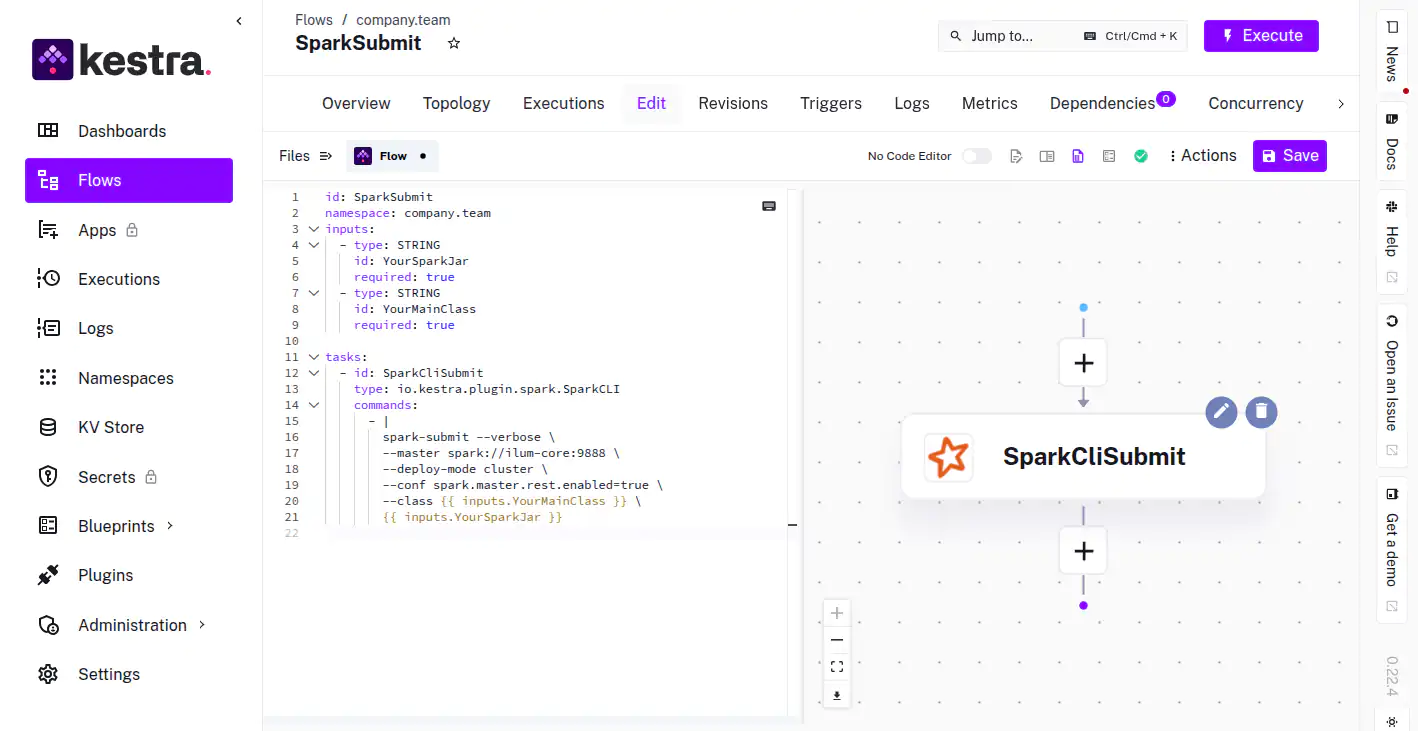
Announcing Kestra Integration in Ilum Data Lakehouse Platform
We're thrilled to announce a transformative upgrade to Ilum Data Lakehouse, the integration of Kestra, the modern, open-source workflow orchestration platform! 🎉 This powerful integration significantly enhances your data management capabilities, driving greater efficiency, automation, and ease of use.
Ilum already supports workflow scheduling with Apache Airflow, but integrating Kestra introduces a dynamic new approach to handling complex data pipelines. Kestra simplifies orchestration through its declarative syntax, real-time workflow monitoring, native event-driven triggers, and comprehensive data lineage tracking capabilities.
Benefits of Kestra Integration with Ilum:
Simplified management of complex data pipelines
Enhanced real-time workflow monitoring and alerting
Efficient handling of event-driven, high-frequency workflows
Improved data lineage visibility and traceability
Seamless multi-cluster workflow management
The Kestra integration perfectly complements Ilum’s advanced architecture and operational framework, offering users a robust alternative for efficient and scalable workflow automation. Optimize your data workflows, enhance operational control, and streamline your processes with Ilum and Kestra.
Discover the full potential of the Ilum-Kestra integration and revolutionize your workflow orchestration capabilities. Learn more at Kestra.io and stay tuned for continuous updates as Ilum evolves to meet your enterprise data management needs!
We’re excited to announce that n8n, the powerful automation tool, is now available as a module in Ilum!
With n8n, you can build custom workflows, automate data tasks, and connect external services, all through a simple, visual interface right inside the Ilum platform.
What You Can Do with n8n in Ilum:
⚙️ Automate Data Pipelines – Trigger Spark jobs, move data between systems, or schedule SQL queries without writing scripts. 🔌 Integrate with Anything – Connect Ilum to external APIs, messaging systems, cloud storage, Slack, Git, and more. 🧠 Build Logic Visually – Drag, drop, and configure nodes to create advanced automation workflows with ease. 📅 Schedule and Monitor – Set up workflows to run on cron schedules, webhook triggers, or conditionally based on data states.
This new module brings no-code/low-code automation to your data platform, giving teams the power to create dynamic, event-driven pipelines and integrations in minutes.
Explore the n8n module today and bring your workflows to life! 🚀 n8n apache spark
We’ve added Trino SQL engine support to Ilum’s SQL interface, giving you even more flexibility and power when querying your data lakehouse.
From now on, you can use both Apache Spark SQL and Trino SQL, even within the same SQL notebook, making it easier to choose the right engine for the job without switching tools.
Key Highlights:
🧠 Dual SQL Engine Support – Mix and match Spark SQL and Trino SQL inside a single workspace. ⚡ Faster Interactive Queries – Use Trino for low-latency SQL queries over your distributed data sources. 🔌 Same UI, More Power – No need to learn a new interface. Trino is fully integrated into Ilum’s existing SQL editor. 📁 Query External Data – Trino makes it easy to connect to external sources like Hive, Iceberg, S3, and more. 🧪 Flexible Execution – Choose the best engine per query or per cell, depending on performance or data access needs.
This feature unlocks new possibilities for real-time exploration, federated querying, and fine-tuned performance optimization—right inside Ilum. Try it today and experience multi-engine querying done right! 🚀
Improved SQL Editor with Selective Query Execution! 🎯
We’ve upgraded the Ilum SQL Editor with a powerful new feature: select and run specific queries directly from a single view—no need to execute the entire notebook or clean up your workspace first.
Key Enhancements:
🧩 Query Picker – Quickly choose which query to execute from a list of all defined queries in your notebook. 🎯 Focused Execution – Run only the SQL block you need, saving time and avoiding unnecessary data scans. 🧭 Better Navigation – Easily jump between queries and manage your workflow more efficiently. 💡 Cleaner Debugging – Isolate and test specific parts of your SQL logic without affecting the rest of the notebook.
This improvement brings more control and flexibility to your data exploration and debugging workflows. Whether you're refining a single query or testing logic step-by-step, Ilum makes it faster and easier.
This release focuses on quality-of-life improvements, platform integrations, and powerful new features to help you work smarter with Apache Spark and your data lakehouse stack.
🚀 What’s New
✅ Trino now in AIO Stack
You asked, we listened, Trino is now included in the default All-in-One (AIO) Ilum deployment. Run blazing-fast distributed SQL queries across your data lake right out of the box.
✅ New Spark Session Form for Jupyter (Sparkmagic)
No more hand-crafted JSON. Create Spark sessions in Jupyter using a streamlined form:
Select cluster
Define memory & dynamic allocation
Add Python packages
Enable auto-pause on idle This is our most user-friendly Spark session setup yet—and we’ll continue improving it!
✅ Markdown Support in SQL Editor
Turn your SQL editor into a lightweight data notebook. Add headers, notes, and explanations with Markdown for clear, documented analysis in-line with your queries.
✅ Resource Quotas & Limits for Spark Jobs
Gain fine-grained control over Spark resources:
Set CPU/memory limits per job
Apply namespace-level quotas
Prevent overuse and ensure team fairness across shared clusters
✅ Grafana in UI Modules
Monitor your workloads in real time. Grafana dashboards are now integrated into Ilum’s UI, providing insights into Spark usage, resource consumption, and system health.
✅ Extra Buckets for Spark Storage
Now you can define additional storage buckets to separate workloads, support multi-tenant setups, or expand available storage for Spark jobs.
🛠️ Under the Hood
📦 MinIO Chart Updated — Now using ^15.x version for better performance and Helm compatibility
🧪 Jupyter SessionConfig Adjustments — Minor tweaks to improve startup behavior and flexibility
This is a minor release, but it brings major improvements to everyday workflows. We’re continuously evolving Ilum to support modern data teams—from infrastructure to analysis.
Thanks for being part of the journey. More coming soon! 🚀💡




 Powered by FeedBear